


Looking back when we were not personalizing at all, our B2B buyers all had the same website experience. An AI startup founder was seeing the same landing page as an enterprise VP. A first-time visitor gets the same CTA as someone who's been researching for weeks; no bueno.
In this guide we aim to walk you through our framework, examples, and rollout plan to implement personalization that we use to drive revenue. You'll learn which pages to start with, how to segment while keeping things simple, and what to measure to prove ROI.
What is B2B website personalization?
The point of B2B website personalization is to adapt your site’s content to the visiting prospect. You can personalize based on their industry, role, intent signals, where they are in the buying process, etc.
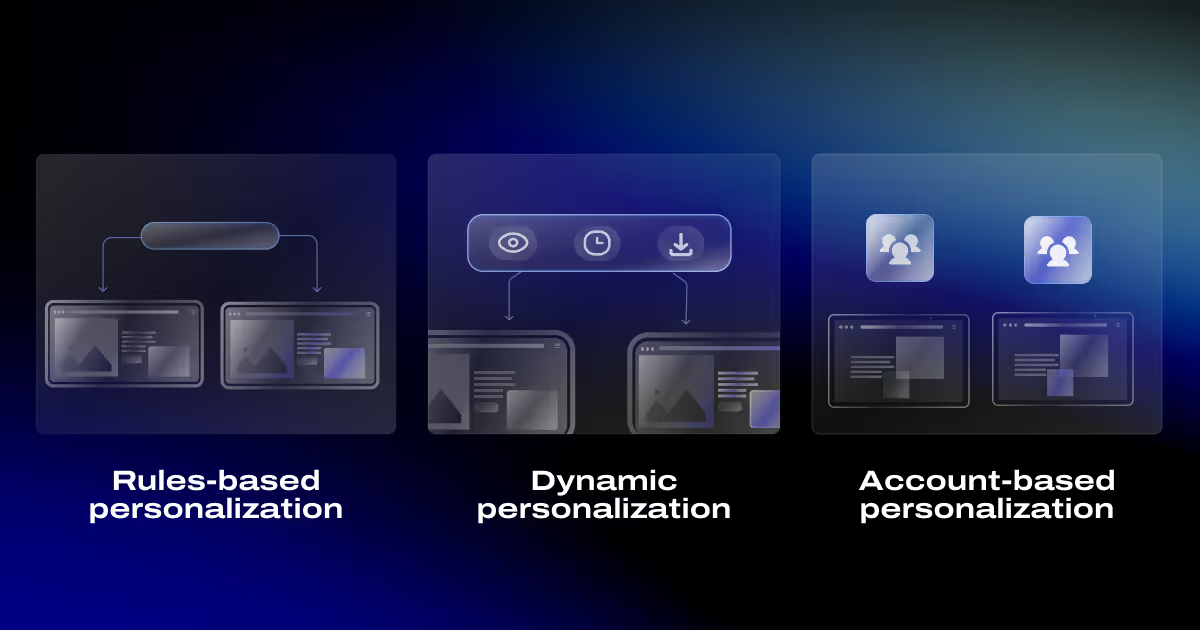
There are three main approaches:
- Rules-based personalization uses if-then logic. If someone works at an AI startup, we show AI case studies. On the other hand, if they landed from a CFO-focused ad, we would tailor messaging to ROI and budget concerns.
- Dynamic personalization uses real-time behavior such as pages viewed, time spent, and resources downloaded. In this case, repeat visits trigger different content variations.
- Account-based personalization targets specific companies on your target account list with custom messaging, proof points, and offers.
Here’s what we count as on personalization:
- Swapping headline and value props based on industry or role
- Showing relevant customer logos and testimonials
- Changing CTAs based on visitor intent (demo request vs download template)
- Recommending content based on what they've already read
Why personalize a B2B website?
Clearly, the more relevant the context to your prospects, the more engaged they will be. When I see a message that speaks directly to my situation, I read longer, and click more. By making your prospects more engaged, your chances of converting them are better. To make a point, page-level personalization brings in up to 40% more revenue compared to average players.
We use personalization to help B2B buyers figure out if we’re the right vendor for them. Our job is to show them exactly what matters to their role or industry, and remove friction from the decision process.
Trust comes from context-specific proof. Here are 2 examples:
- Our AI clients usually book a discovery call after reading one of our AI case studies, and not EdTech ones.
- Startup founders care a lot about how building a new website will drive more revenue for them, but never mention accessibility and security features. That’s a polar opposite from enterprise buyers.
The 3 levels of personalization
Level 1: Segment-based personalization
Group visitors into 2-5 broad segments using firmographic or behavioral signals like industry, company size, use case, or traffic source.
Show different messaging blocks, proof points, and CTAs to each segment. For example:
- A startup AI buyer sees our Bland AI case studies.
- A blockchain finance company sees tailored pain points and logos in the pricing page.
In our practice, this approach works best for commercial pages such as pricing pages, demo, and resource center. This is where most teams focused on organic traffic should start. Else, if using PPC to attract traffic, also personalize home page messaging.
Level 2: Account-based personalization (ABM-style)
Target specific companies on your ICP list with custom experiences. When someone from a target account visits, show messaging that acknowledges their company and includes proof from similar-sized organizations.
This use case performs well on pricing pages, demo request pages, and case study hubs, where high-intent buyers are in evaluation mode.
Level 3: 1:1 personalization
You may want to personalize visitors who've already engaged with you. It’s well suited for sales heavy teams, this approach leads to CRMs, trial users, and existing customers.
This use case is well suited for logged-in areas in websites that function like web apps. Good spots are customer portals, renewal flows, and post-demo nurture experiences. As these types of projects have not been a part of our core offering, we don’t use this type of personalization.
What you can personalize
Messaging blocks (headline + subhead + bullets)
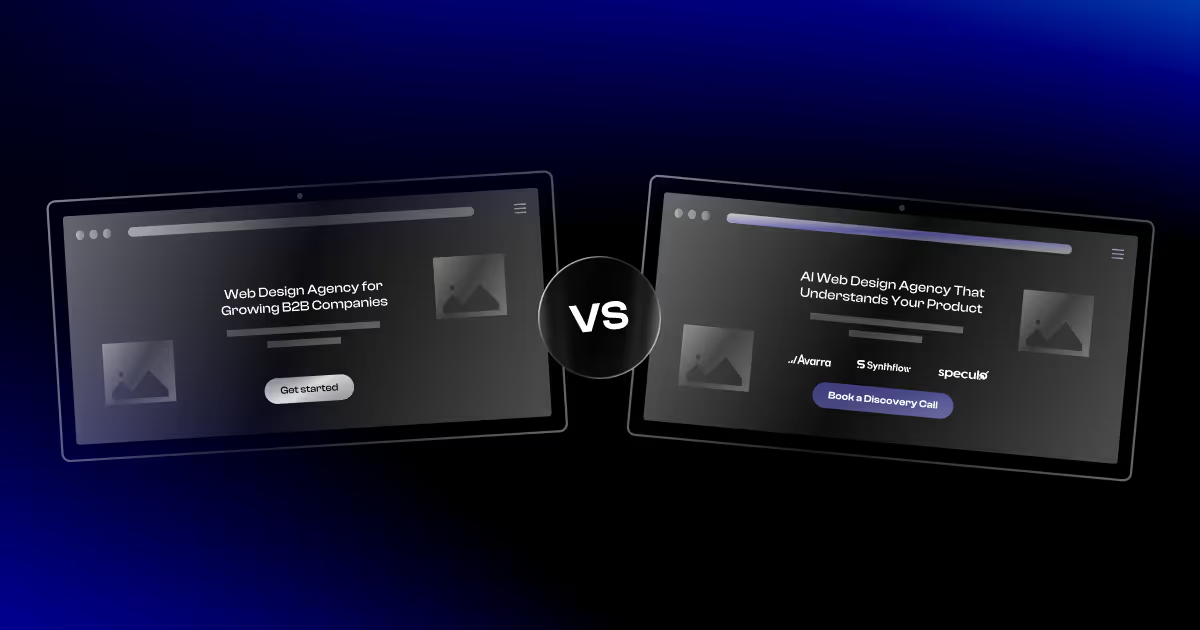
Swap your headline to call out their specific world. Our example is changing out "Strategy-led websites that drive B2B growth," for "Strategy-led websites that drive conversational AI growth."
You should also change your value props to match what they care about. A CFO cares about cost savings and reporting. A VP of Marketing cares about speed and campaign ROI.
Before personalizing, talk to the correct personas for professional context.
Proof blocks (logos, testimonials, metrics)
Show customer logos from their industry. A SaaS company visiting your site wants to see other SaaS companies, not retail brands.
Surface testimonials from similar roles or company sizes. A startup founder relates to other founders, not Fortune 500 executives.
Highlight metrics that matter to them. Enterprise buyers want security certifications and uptime guarantees. Startups want time-to-value and ease of setup.
CTAs (what action they should take next)
Match your call-to-action to their intent level. Low-intent visitors who just discovered you should get soft CTAs like "See examples" or "Download template."
High-intent visitors who've viewed pricing and case studies multiple times should see "Book a demo" or "Talk to sales."
Navigation and recommended content
Add "Recommended for you" sections on resource pages. If someone reads three articles about email marketing, recommend your email marketing case study next.
Surface the most relevant content based on their segment. Keep it simple, up to three smart recommendations.
Inline CTA personalization examples:
- First-time visitor: "See how it works - 2-min tour"
- Returning visitor (3+ visits): "Book a 15-minute demo"
- Visitor from finance-focused ad: "Calculate your ROI →" (opens ROI calculator)
Badge personalization examples:
- Healthcare visitors: “HIPAA • SOC 2 Type II”
Startups / SMB visitors: “Stripe | HubSpot | Webflow” - Enterprise visitors: “SOC 2 Type II | ISO 27001 | SSO/SAML
Data signals that power B2B website personalization
You need data to personalize effectively. There are 5 types of signals:
- Firmographic signals come from reverse IP lookup or form fills. Industry, company size, location.
- Intent signals come from how someone found you. Paid search keywords, ad copy, LinkedIn campaign.
- Behavioral signals track what they do on your site. Pages viewed, time spent, repeat visits, resources downloaded.
- Lifecycle signals come from your CRM. New lead vs opportunity vs customer.
- Source context: Someone arriving from an outbound email has different expectations than cold search traffic.
Here's where we found each signal works well:
Start with one or two signals, since there is no need to use all on day one.
What we like to personalize first (highest ROI order)
1) Pricing page
Your pricing page gets the highest-intent traffic. People visit it to figure out whether they should buy it or not.
You can personalize this page by saving the visitor's last visited industry page in cookies. Then as they land in the pricing page, swap in the matching proof (logos and testimonials), niche-specific problems, and expected outcomes. You should keep the layout identical and only change the proof and CTA.
2) Demo / Contact page
Deals start in demo pages. The goal of personalization is to remove friction where it isn’t needed.
You can use a similar mechanism we explained in Pricing page personalization to place a small segment-specific trust block above the form (compliance badges, speed to value, relevant logos) and keep the form as short as possible for most visitors.
Depending on your segmentation, you can change up some fields. I.e. Add extra 1-2 fields to qualify enterprise buyers. Keep SMB stays minimal. In this way, you won’t increase the conversion rate by much, but you will avoid leaving money on the table in enterprise deals.
3) Solutions / Use case pages
These pages attract mid-funnel traffic researching a specific capability.
Create dedicated solution narratives much like our "Webflow for Conversational AI" with matching pain points, outcomes, proof, and CTAs built for that audience.
4) Case study hub
People browse case studies to confirm you've solved their exact problem.
Similar to how we personalized the pricing page, you can save the last industry page in cookies. Later on, when they visit the case study hub, you should auto-filter and prioritize stories from that same industry. Essentially, you’re feeding the prospect case studies like theirs.
5) Thank you pages
Thank you pages are a second conversion moment. Use them to direct the next best step.
If you’re showing a thank you page after the prospect has downloaded a resource, thank them for downloading and recommend to them your core offer page related to that resource.
For example, if they grabbed our Funnel Mapping Template, the thank you page would recommend our SEO lead generation services (soft offer), plus 1-2 supporting links such as an article and a related case study. Keep it focused: one primary CTA, one secondary CTA, and proof.
Statistical guidance for personalization tests
You need enough people to see your page to tell if personalization worked. If only 3 people convert, you can’t trust the result.
Aim for about 100 conversions per version (Version A and Version B).
To guess how much traffic you need, use the following formula:
- Visitors needed ≈ 100 ÷ your current conversion rate
For example, if your page converts at 2%, you’ll need around 5,000 visitors per version, as 100 ÷ 0.02 = 5,000.
Also:
- Run the test for at least 2 full weeks.
- Don’t stop early just because it looks like a winner as results may be skewed.
If you want help setting up a testing plan you can trust (tracking, QA, and analysis), talk to our Conversion Rate Optimization Experts.
If you don’t have enough traffic, and most sites don’t, you may not need A/B testing. Go for qualitative research instead.
Step 1: Sanity-check with humans
- Talk to 5 - 10 people
- Watch ~20 session recordings (where people click, and get stuck)
Step 2: Ship one personalized version
Pick one important segment, launch the personalized version, and compare:
- Before vs after (same page, different period)
Optional: Buy a little traffic
Run a small paid / ABM campaign to the personalized page and track easy signals first:
- CTA clicks
- scroll depth
- case study clicks
Focus on the money pages. You’ll get answers faster on:
- Pricing
- Demo
- other high-intent landing pages
How B2B companies personalize website content for buyer personas
Most teams create 8–12 personas and never use them. Don’t do that.
Step 1: Pick 2–3 personas
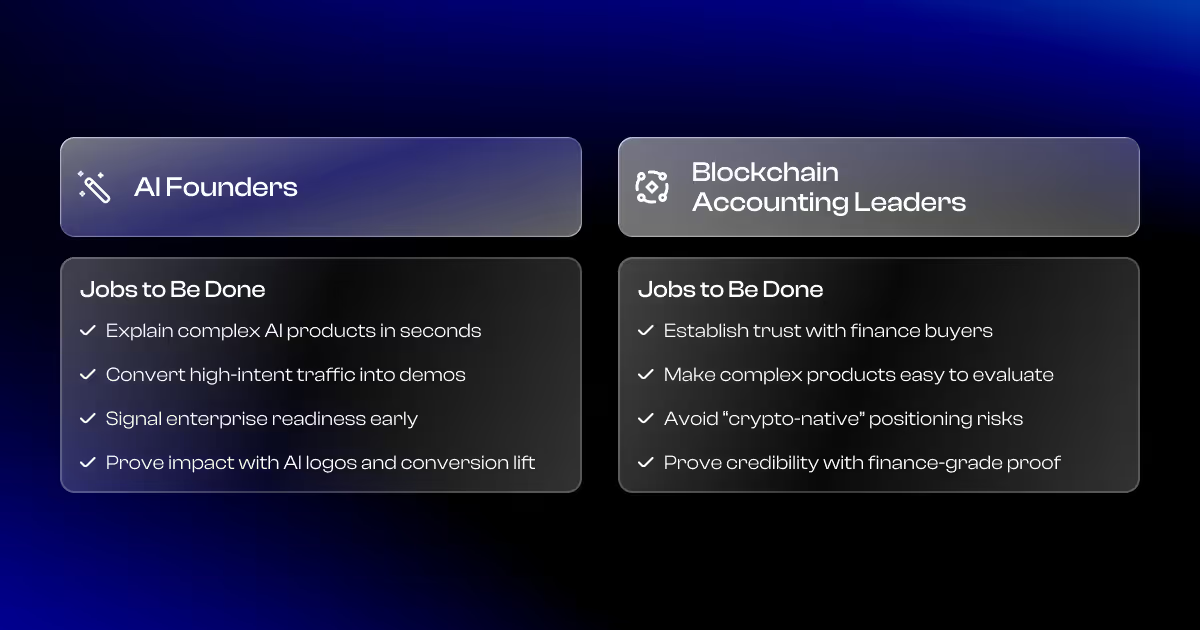
We started with who we sell to: CMOs and co-founders at AI firms (Seed–Series C), and execs at blockchain finance/accounting firms. Use CRM and sales calls to confirm which personas influence the deal.
Step 2: List their jobs to be done
Blockchain finance/accounting execs want enterprise credibility and more SQLs. The main jobs to be done (JTBD) are:
- Establish a trustworthy brand associated with mature finance and avoiding “Crypto” in the narrative.
- Get more organic traffic (better conversions compared to ads) to commercial pages through SEO
AI founders (Seed–Series C) want a website that turns technical product value into qualified demos, without pulling engineering into marketing. The main JTBD are:
- Make the product instantly understandable and differentiated so the ICP “gets it” in seconds.
- Turn the website into a lead-gen machine so it converts more traffic into qualified meetings.
- Enable marketing to update the site and launch tests without engineering, so engineers stay focused on the product instead of doing copy edits and landing page tweaks.
Step 3: Personalize by intent
Personalize what people see after they show intent, i.e. after visiting an AI industry page. Use that signal to recommend the most relevant next content: AI case studies, AI-focused playbooks, or CTAs built for that segment.
Step 4: Build a small set of “recommended content” modules
Swap only the recommended content block (2–4 links), a proof snippet (logos/testimonial), and a CTA. This is easier to ship, easier to track, and still feels highly personalized.
Step 5: Tie each variation to one measurable KPI
Every persona version needs a number: demo request rate, lead quality (MQL%), trial/signup rate, or conversion-to-opportunity. If you can’t measure it, it doesn’t need personalization.
How We Personalize B2B Websites (7-step rollout plan)
- Pick a goal and measure one KPI (demo requests, qualified leads, pipeline, etc.).
- Pick one page (high-intent first)
- Define 2–3 segments maximum (use industry, size, and behavior signals)
- Build modular content blocks
- Launch rules-based personalization: Start with if/then logic (industry → matching proof, company size → matching CTA).
- Run A/B tests and measure lift. Test the personalized version against a control and track your one goal metric.
- Scale to journey-level personalization. After page-level wins, expand to multi-page flows across visits (education → proof → demo CTA).
When AI-Driven Personalization Helps (and when it hurts)
Where AI helps
- Clustering segments: AI can analyze thousands of visitors and identify patterns you'd never spot manually.
- Content recommendations: Algorithms excel at "people who read X also read Y" logic.
- Testing ideas faster: AI can help generate messaging variations for different segments. It speeds up the brainstorming process.
Where AI hurts
- Wrong assumptions: AI is known to hallucinate. Just because two groups convert at similar rates doesn't mean they need the same messaging.
- Generic AI copy: Auto-generated headlines and value props often sound like every other AI-written website. They lack specificity and voice.
- Compliance and brand risk: AI doesn't understand your legal requirements, brand guidelines, or industry regulations.
When We Use AI
We use AI to generate options, find patterns, and speed up execution. After using AI we validate strategy, approve copy, and own the results.
Mistakes to avoid
Personalizing too many pages at once
Too many pages splits focus and makes results impossible to attribute. Start with one high-intent page and prove lift before expanding.
Not measuring KPIs
If you can’t measure improvements, you’re guessing what works and what doesn’t. Define one KPI per test and run a clean control vs variant.
Over-personalized experiences
Don’t make shaky assumptions. Speak to a professional context and not identity.
Slowing down the site
Don’t tank load time and conversions by overusing scripts. Keep pages loading under 3 seconds and test performance per variation.
Breaking SEO with hidden or duplicate content
Avoid separate URLs for variants. Use client-side swaps responsibly and don’t implement anything that looks like cloaking; for heavy personalization, use SSR/prerendering.
Tools and stack
Conclusion
Use B2B website personalization to ship a few measurable swaps on the pages where buyer intent already exists.
If you want the simplest place to start:
- Pick one money page (pricing or demo)
- Pick two segments (AI vs Blockchain, or SMB vs Enterprise)
- Swap only: proof (logos/testimonial) + CTA + 2–3 bullets
- Run a clean test for 2+ weeks and keep what lifts conversions
Although 90% of marketers claim that personalization improves profits, the majority still struggles with it per this Gartner report.
We see it as an opportunity, and if you want to implement personalization like many marketers, we can help you:
- Define the segments + swap blocks
- Build the personalization logic in Webflow (SEO-safe)
- Set up measurement so you can prove lift
Next step: Book a discovery call and we’ll map the first page + segment you should ship.
FAQs
What is B2B website personalization?
B2B website personalization is the process in which you show different messaging, proof, and CTAs based on signals like industry, company size, intent, and behavior.
Why personalize a B2B website?
Personalizing your website increases relevance aimed at your ICP, which ultimately improves engagement, conversion rates, and lead quality.
How do you personalize without being creepy?
Personalize to professional context, not personal identity. Use expected signals (industry, company size, traffic source, pages viewed), and avoid over-specific callouts like “we saw you visited pricing 3 times.”
What personalization examples work best in B2B?
The safest, highest-ROI plays are: industry-specific headline + proof, intent-based CTAs, recommended next content (case studies, service pages, playbooks), and credibility badges (security, compliance, SLAs). For service businesses, we prefer recommended content modules triggered by visits to industry pages.
Does personalization hurt SEO?
Not if you keep one canonical URL and avoid anything that looks like cloaking. Use lightweight client-side swaps (or SSR/prerendering for heavier setups) and keep performance fast.
What should we personalize first?
Start where commercial intent is highest: pricing, demo/contact, and high-intent landing pages. If your strategy is industry-led, prioritize industry pages > recommended next steps (relevant services, case studies, and conversion assets).
Is AI-driven personalization worth it?
AI helps with pattern detection, clustering, and recommendations; it shouldn’t own strategy or copy. Use AI to speed up testing, then validate results yourself.
How do I measure ROI from personalization?
Measure lift vs a control on one KPI (demo requests, lead rate, MQL%), then translate it into pipeline using your close rate and deal size. If you can’t measure it, don’t scale it.